Introduction (परिचय)
Computer system केवल CPU और memory से नहीं चलता।
User और system के बीच communication के लिए Input/Output (I/O) devices की जरूरत होती है।
जैसे:
- Keyboard (input)
- Monitor (output)
- Printer
- Disk
इन सभी devices को organize और manage करने का काम Operating System करता है।
I/O Devices Organization क्या होता है
I/O Devices Organization वह structure है जिसके माध्यम से computer system input और output devices को efficiently manage करता है।
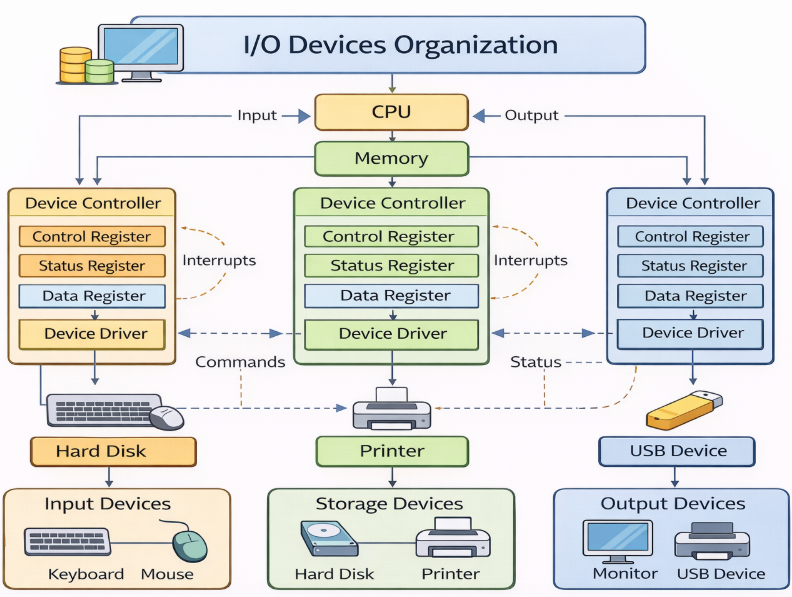
Basic Structure (Main Components)
I/O system में मुख्यतः ये components होते हैं:
1. I/O Devices
- Physical devices जो input या output देते हैं
Example:
Keyboard, Mouse, Printer, Hard Disk
2. Device Controller
- यह device और CPU के बीच interface होता है
- Device controller data transfer को manage करता है
Example:
Disk controller, USB controller
3. Device Driver
- यह software होता है जो OS और device के बीच communication कराता है
Example:
Printer driver
Working
- User input देता है (keyboard से)
- Device controller signal को process करता है
- OS device driver के माध्यम से instruction देता है
- Data CPU या memory तक पहुँचता है
I/O Organization Flow
User → I/O Device → Controller → OS → CPU/Memory
Types of I/O Operations
1. Synchronous I/O
- Process wait करता है जब तक I/O complete न हो जाए
2. Asynchronous I/O
- Process wait नहीं करता, आगे काम करता रहता है
Example
आप printer से print देते हैं:
- आपने print command दिया
- OS ने printer driver को call किया
- Controller ने printer को signal दिया
- Document print हो गया
Key Points
- I/O devices = user interaction
- Controller = bridge
- Driver = communication software
- OS = manager
Conclusion
I/O Devices Organization computer system का महत्वपूर्ण हिस्सा है, जो input और output devices को efficiently manage करता है और user को system से interact करने में मदद करता है।